
I’ve been running AI agents for a while now. Most of them are forgetful and within my IDE (Cursor), you close the session and everything is gone. POOF!
Hermes Agent, though, is built different. It has a self-learning loop built in. It creates skills from experience, remembers who you are across sessions, and searches its own past conversations. ALl of which, personally sold me.
After spending time deep in the docs, some youtube videos, the codebase, and actually using it daily, I’ve put together everything worth knowing about getting started and getting the most out of it.
This is the guide I wish I had on day one. I’m also still learning and will continue to post updates as I uncover more.
What Is Hermes Agent?
Hermes Agent is an open-source, self-improving AI agent. It runs in your terminal, on Telegram, Discord, Slack, WhatsApp, Signal - basically wherever you already are. One gateway process connects all of them.
The key differentiator: it learns. Not in the “we fine-tuned a model” sense. It creates reusable skills after complex tasks, improves those skills during use, persists memory about you and your environment, and can search its own conversation history with full-text search and LLM summarization.
The latest release is v0.5.0 (March 28, 2026) - the hardening release. It added Hugging Face as a first-class inference provider, Telegram Private Chat Topics, native Modal SDK backend, plugin lifecycle hooks, and over 50 security and reliability fixes.
Comparison: Hermes Agent vs OpenClaw vs Agent Zero
| Factor | Hermes Agent | OpenClaw | Agent Zero |
|---|---|---|---|
| Age | Newest | ~1 year | ~2 years (most mature) |
| Polish | Rough around edges | More polished UI | Most complex setups possible |
| Self-improvement | Built-in (GEPA) | No | Limited |
| Memory | 4 layers (SQLite + MD + skills + Honcho) | Markdown files only | Varies |
| Heartbeat | None | Every 30 min | Varies |
| Target user | Developer-focused but general | Mass market | Power users |
| Heartbeat cost | Lower (no polling) | Higher (constant) | Varies |
| Skills | 80+ built-in, auto-created | Manual | Manual |
| Terminal backends | 6 (local, Docker, SSH, Modal, Daytona, Singularity) | Limited | Limited |
| Maturity risk | More bugs, less polished | Stable | Most stable |
Installation
From scratch, Hermes will get up to speed fastest because it self-improves. It does the heavy lifting for you. The setup is not as extensive as it’s rival AgentZero.
The quick install handles everything - Python, Node.js, dependencies, and the hermes command. No prerequisites except git.
curl -fsSL https://raw.githubusercontent.com/NousResearch/hermes-agent/main/scripts/install.sh | bash
Works on Linux, macOS, and WSL2. Native Windows is not supported so use WSL2, but you should truly place it on Linux or MacOS.
After installation:
source ~/.bashrc    # reload shell (or: source ~/.zshrc)
hermes              # start chatting
First-Time Setup
Run the setup wizard. It walks you through everything in one pass:
hermes setup
This configures your LLM provider, API keys, enabled tools, and messaging integrations. If you’re coming from OpenClaw, the wizard detects your existing config and offers to migrate automatically.
You can also configure things individually:
hermes model         # Choose your LLM provider and model
hermes tools         # Configure which tools are enabled
hermes config set    # Set individual config values
hermes doctor        # Diagnose any issues
Choosing Your Model
This is where Hermes stands out. You’re not locked into a single provider. Use any of these:
- Nous Portal - 400+ models through a single endpoint. Run
hermes loginto get started. - OpenRouter - 200+ models with one API key from openrouter.ai.
- Anthropic - Direct API access (Claude models).
- Hugging Face - Full HF Inference API integration with curated agentic model picker.
- z.ai / GLM - ZhipuAI models.
- Kimi / Moonshot - Coding-focused models.
- OpenAI - GPT models with improved tool-use reliability.
- Local servers - LM Studio, Ollama, vLLM, llama.cpp. Any OpenAI-compatible endpoint works.
Switch models on the fly with no code changes:
hermes model
Or inside a conversation:
/model anthropic/claude-opus-4.6
Configuration Files
Two files control everything:
~/.hermes/config.yaml - Settings, model selection, tool toggles, provider config. The config supports environment variable overrides, so anything you set in .env takes precedence.
~/.hermes/.env - API keys and secrets. This is where your provider credentials live.
# Example config.yaml
model:
  default: "anthropic/claude-opus-4.6"
  provider: "auto"  # Auto-detect from credentials

tools:
  enabled: ["terminal", "file", "web", "browser", "memory", "code_execution"]
# Example .env
OPENROUTER_API_KEY=sk-or-...
ANTHROPIC_API_KEY=sk-ant-...
The Skills System
This is the feature I didn’t know I needed. After completing complex tasks, Hermes offers to save the approach as a reusable skill. Skills are Markdown files with YAML frontmatter that define triggers, steps, pitfalls, and verification.
You can browse available skills:
/skills
Load a specific skill:
/<skill-name>
Skills live in ~/.hermes/skills/ and self-improve during use. If a skill has wrong steps or missing pitfalls, Hermes patches it automatically. There’s also the Skills Hub - a community registry at agentskills.io where you can discover and install skills others have shared.
The practical impact: tasks I do repeatedly (deploying services, reviewing PRs, writing blog posts) all have skills now. Each one gets better every time I use it.
Notable Integrations
- 15+ LLM providers: OpenRouter (200+ models), Nous Portal (400+ models), Anthropic, OpenAI, Codex, Copilot, GLM, Kimi, MiniMax, HuggingFace, local (LM Studio, Ollama, vLLM, llama.cpp)
- 6 terminal backends: local, Docker, SSH, Modal (serverless GPU), Daytona, Singularity (HPC)
- Messaging: Telegram (with private chat topics), Discord, Slack, WhatsApp, Signal, Matrix, Mattermost, Email, Home Assistant
- Browser automation: Browserbase, Browser Use
- Voice: TTS (Edge, OpenAI, ElevenLabs), STT (local Whisper, OpenAI Whisper)
Memory That Actually Works
Hermes has two memory stores:
User memory - Facts about you. Your name, role, preferences, coding style, pet peeves. This gets injected into every conversation automatically.
Agent memory - Notes the agent keeps for itself. Environment details, tool quirks, project conventions, lessons learned from past sessions.
Memory persists across sessions. No more repeating yourself. The agent also uses FTS5 session search with LLM summarization to recall specific past conversations when relevant.
# In conversation, the agent proactively saves things like:
# "User prefers dark themes in all editors"
# "Project uses conventional commits"
# "Always use uv instead of pip for this project"
The key insight: the most valuable memory is the kind that prevents you from having to correct or remind the agent again.
Cron Jobs: Scheduled Automations
Built-in cron scheduler with natural language definitions. Set up daily reports, nightly backups, weekly audits - all running unattended.
# Inside conversation:
"Set up a cron job that runs every morning at 9am, checks my GitHub notifications, and sends me a summary on Telegram."
Cron jobs run autonomously with no user present. They can deliver results to any platform - Telegram, Discord, Slack, email, or back to your CLI. The syntax supports standard cron expressions, intervals, and one-shot ISO timestamps.
Messaging Gateway
One gateway process connects all your platforms:
hermes gateway setup   # Configure platform integrations
hermes gateway start   # Start the gateway
Supported platforms: Telegram, Discord, Slack, WhatsApp, Signal, Matrix, Mattermost, Home Assistant, DingTalk, Email, SMS. Voice memo transcription works on platforms that support audio.
The gateway supports Telegram Private Chat Topics in v0.5.0 - project-based conversations with functional skill binding per topic, enabling isolated workflows within a single Telegram chat.
Subagents and Parallel Execution
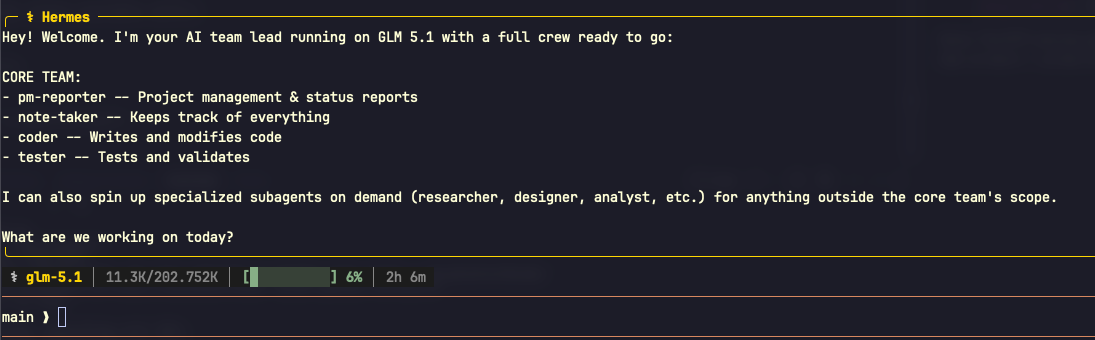
Hermes can spawn isolated subagents for parallel workstreams. Each subagent gets its own conversation, terminal session, and toolset. Only the final summary comes back to your context.
Use this when:
- You have multiple independent research tasks
- You want to run tasks that would flood your context with intermediate data
- You need parallel execution to save time
The execute_code tool is another power move - write Python scripts that call Hermes tools programmatically. Collapse multi-step pipelines (fetch N pages, process N files, retry on failure) into zero-context-cost turns.
Tips and Tricks
Here’s what I’ve found actually makes a difference in daily use:
Run hermes doctor when something feels off. It diagnoses configuration issues, missing dependencies, and connectivity problems. Faster than debugging yourself.
Use context files. Drop a CONTEXT.md or .hermescontext in your project root. The agent reads it at the start of every conversation. Perfect for project-specific conventions, architecture decisions, and recurring patterns.
Set a personality. /personality concise or create your own in the persona config. The default is thorough, but sometimes you just want answers.
Compress context proactively. /compress when a conversation is getting long. The agent summarizes and continues without losing the thread.
Check usage. /usage shows token consumption. /insights --days 7 gives you a weekly breakdown. Useful for cost management.
Interrupt and redirect. Send a new message to interrupt the current task. The agent picks up your new direction immediately. No waiting.
Terminal backends matter. If you’re running on a VPS, consider Docker or Modal backends. They offer isolation and serverless persistence - your agent’s environment hibernates when idle and wakes on demand. Costs nearly nothing between sessions.
The /retry and /undo commands are underrated. Model gave a bad response? /retry generates a new one. Agent went down the wrong path? /undo rolls it back.
Common Pitfalls
Security scanners may block piped curl commands. The quick install uses curl | bash. If your security setup blocks this, save the script first and review it:
curl -fsSL https://raw.githubusercontent.com/NousResearch/hermes-agent/main/scripts/install.sh -o install.sh
less install.sh
bash install.sh
Always activate the virtual environment when developing. If you’re contributing or running from source:
source venv/bin/activate # ALWAYS
API key precedence. Environment variables in .env override config.yaml. If something isn’t working, check both files.
Context window management. Long conversations eat tokens. Use /compress regularly, especially when switching between unrelated tasks in the same session.
Platform-specific tool configuration. Tools can be enabled/disabled per platform. What runs in CLI might not be what you want exposed on Telegram. Run hermes tools to manage this.
The Slash Command Quick Reference
These work in both CLI and messaging platforms:
| Command | What it does |
|---|---|
/new or /reset | Start a fresh conversation |
/model [provider:model] | Switch models mid-conversation |
/personality [name] | Set the agent’s personality |
/retry | Regenerate the last response |
/undo | Roll back the last turn |
/compress | Compress context to save tokens |
/usage | Check token consumption |
/skills | Browse available skills |
/stop | Interrupt current work |
Why I Keep Using It
The self-improvement loop is real. My agent today is noticeably better than it was a week ago. It knows my preferences, remembers my project conventions, and has a growing library of skills tailored to my workflow. The cron jobs handle my morning routine. The memory means I never repeat myself.
It can on a $5 VPS, talks to me on Telegram, and costs nearly nothing when idle. That’s the kind of tool that changes how you work.
How are you using AI agents in your daily workflow?
Let me know on X at https://x.com/aarongxa